We buildthe softwareyour restaurant runs on.
Not just a brochure site. An application that takes the bookings, holds the diary, issues the paperwork and tells you what you earned — in your language, on your customers' phones.
- apps in production
- 0apps in production
- languages, RTL included
- 0languages, RTL included
- server to rent
- 0server to rent
What's your trade?
Pick one, and the rest of this page talks about nothing but you.
Switch trade whenever you like — everything recomposes.
Not built yet, but the foundation is the same. Tell us and your trade moves to the front.
Live
Restaurant & snack bar
The ticket prints, the stock drops, and you see it from home.
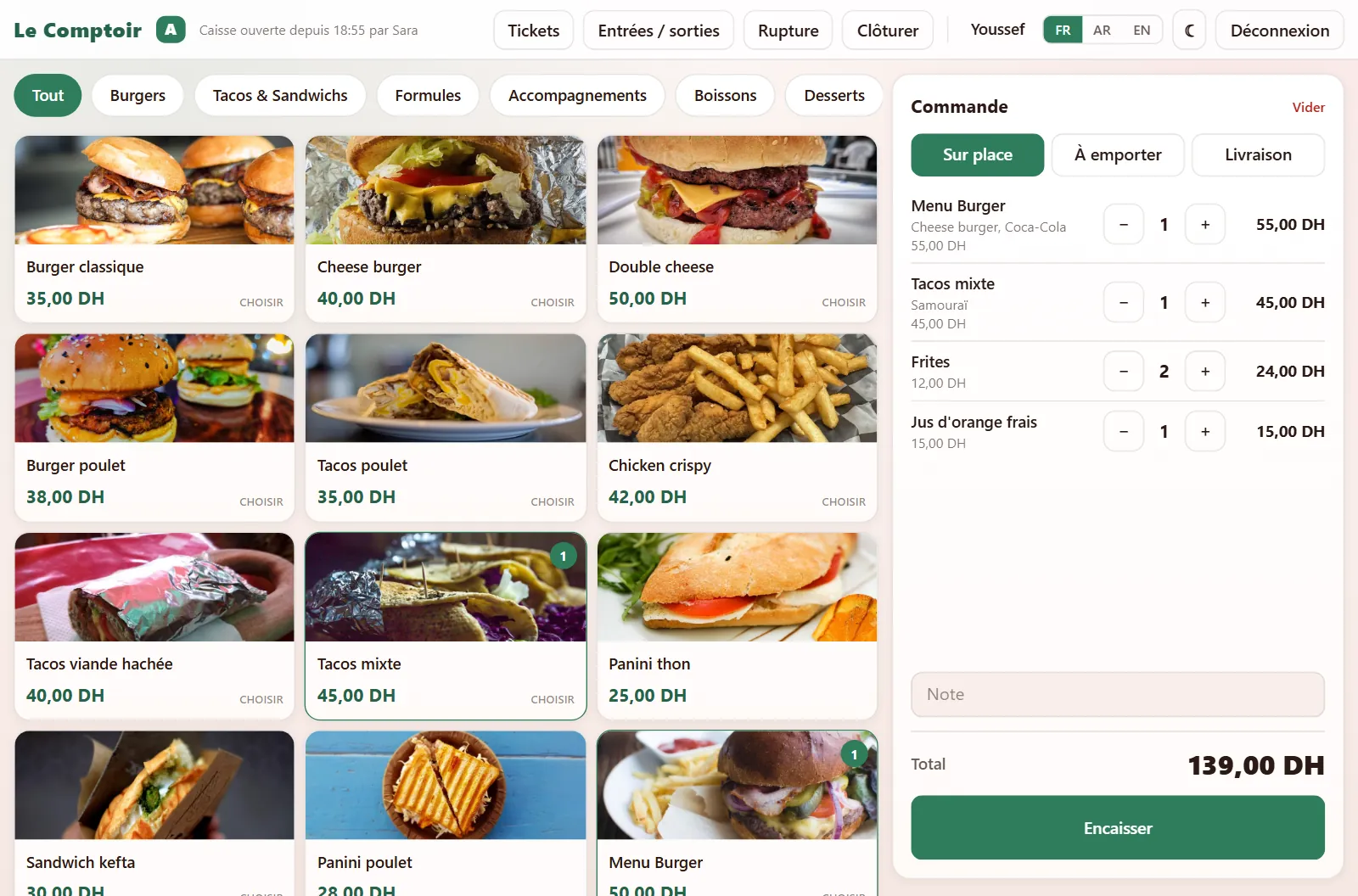
A till for a restaurant or snack bar, on a tablet, trilingual, in the house colours. The cashier taps the products, picks the sauce or the drink of a set menu, takes the money and prints the ticket; every sale takes out of stock exactly what it used. The owner sees everything from his phone: what sells, for how much, who cancelled what, and what will run out tomorrow. And if the internet drops mid-service, the till keeps going.
- sales lost when the internet drops
- 0sales lost when the internet drops
- permissions to grant or remove, per employee
- 18permissions to grant or remove, per employee
- languages, Arabic RTL included
- 3languages, Arabic RTL included
1× Burger meal
Coke · Ketchup
1× Chicken tacos
1× Fries
Leaves the stock
Real screens from the delivered application.
Internet cuts out mid-service? The till keeps going.
The network drops at 1 pm; the queue does not. The till keeps taking payments and printing, keeps the tickets on the tablet, and sends them on its own as soon as the connection is back. The cashier has nothing to do and nothing to type again.
- Tickets keep printing, numbered on their own (A-012…)
- The till reopens with no network, even after a restart
- Sent automatically when the internet is back — never twice
- The owner sees which tickets were sold offline
A till learnt in a minute
Tiles by category, with the product's photo. A set menu asks for its choice — the sauce, the drink — before it goes in the cart, and a paid extra adds to the price. Change worked out, ticket printed on the 80 mm printer, a kitchen slip if you want one.
Stock goes down on its own
Each product has its recipe: a burger is a bun, a patty, a slice of cheese. Every sale takes them out, every cancellation puts them back, and the drink picked in a set menu leaves the right shelf. Alerts come before it runs out, not after.
The owner sees everything, from home
Revenue, tickets, average basket, sales by hour and by employee, best sellers, discounts, cancellations line by line with who and why. The dashboard updates itself during service, on the owner's phone.
Each employee, their own access
The till for one, the stock for another, discounts for the one you trust. Access is given when the account is created and taken away whenever you like. Nothing is erased: a cancellation stays in the log, with who did it and why.
Glovo, delivery, discounts
A Glovo order takes its marked-up price, and its commission comes off the net figure. Your own delivery keeps the customer's name and phone and adds its fee. Discounts and free items are capped, and each one asks for a reason.
VAT and the accountant
The ticket and the Z close-out show the amount before tax, VAT per rate and the total. One button exports the period to Excel — sales by day, VAT, tickets, drawers, supplier purchases, stock — ready to send to the accountant.
- 1
The cashier opens the drawer
He signs in with his code, picks his till and counts the float. From then on, every ticket carries his name.
- 2
He builds the order
Eat in, takeaway, delivery or Glovo. Set menus ask for their choices, extras add on, a discount asks for its reason.
- 3
He takes payment
Cash or card, change worked out. The price comes from the server, never the tablet: a tampered screen cannot sell a burger for 1 dirham.
- 4
The ticket prints, the stock drops
Customer ticket with VAT, kitchen slip, and the recipe taken out of stock in the same move. With no internet the ticket still goes out, and syncs when the network is back.
- 5
He closes, the owner checks
At the end of service the cashier counts the drawer without seeing the expected amount. The Z close-out shows the gap, and the owner finds it on his phone with everything else.
Dashboard
Revenue, net of commissions, VAT, sales by hour, employee and channel, cancellations and discounts, live during service.
Tickets and drawers
Every ticket, reprintable. Every drawer opened and closed, with its float, its cash in and out and its gap.
Stock
Levels per shop, alert thresholds, deliveries, waste and counts, every movement with its author.
Suppliers
A purchase order suggested from what is running low, sent on WhatsApp, received straight into stock.
Menu
Categories, products, photos, prices, VAT, set menus and extras, recipes. A sold-out product is switched off in one tap.
Team and log
One account per employee with its permissions, and a log of everything done: sign-ins, cancellations, discounts, reprints.
modStockStock and recipesmodOptionsSet menus and extrasmodDiscountsDiscounts and free itemsmodDeliveryOwn deliverymodPlatformsGlovo and platformsmodSuppliersSuppliersmodOfflineOffline salesmodVatVATmodPhotosProduct photosmodBranchesSeveral shops
This is what you get.
Real screens from software in production, with invented data. Nothing here was redrawn for this page.
A setup, then a subscription.
The setup covers design and launch. The subscription covers hosting, backups, fixes and support. Every project is quoted free, after a fifteen-minute chat.
Offline mode included, from Essential up
Internet down? The till keeps taking payments and printing, then sends everything on its own when the network is back — nothing lost, nothing doubled.
- Till + back office, on a tablet, a computer or a phone
- Trilingual French / Arabic / English, Arabic RTL included
- Your menu, your prices, your logo and colours
- Updates included, nothing to reinstall
- Cloudflare hosting, HTTPS certificate and backups
- Staff training on delivery — hardware (tablet, 80 mm printer) not included
You picked a trade — here is the plan that answers it.
Essential
One snack bar, one till, and an owner who wants to see everything.
On quote
Free quote, in fifteen minutes on WhatsApp.
Pro as soon as you sell set menus or deliver through Glovo.
- Touch till: printed ticket, change due, Z close-out
- Stock taken off with every sale, alerts before it runs out
- Sales, cancellations and drawer per employee, from your phone
- One login per employee: the till for one, the stock for another
- VAT on the ticket, Excel export for the accountant
Pro
Set menus, delivery, several tills.
On quote
Free quote, in fifteen minutes on WhatsApp.
- Everything in Essential, plus:
- Set menus and extras, the customer's choice on the ticket and in the stock
- Delivery and Glovo, commission taken off net revenue
- Discounts and free items, capped and justified
- Supplier orders, received straight into stock
- Several tills, product photos on screen
Bespoke
Several locations, or a need nothing off-the-shelf covers.
On quote
Free quote, in fifteen minutes on WhatsApp.
- Everything in Pro, plus:
- Features written for your trade alone
- Several branches under one back-office
- Connection to the tools you already use
- Priority support and a planned roadmap
Quotes in dirhams, excluding tax. The domain name is billed at cost or stays in your name. The subscription is paid monthly or yearly and stops when you decide: the app and your data stay exportable.
Compliant with law 09-08 on delivery day, not six months later.
Collecting a name and a phone number puts your business under law 09-08. With us, the work is done before delivery.
Consent the server checks
The box is never pre-ticked, and the server refuses the booking without it — a box the server ignores is decoration. The date and the exact wording shown are recorded on the row, so you can say later what that particular person agreed to.
The notice where the typing happens, in three languages
Article 5 wants the person informed before they hand anything over. So the text sits above the button, not in a footer, and the full page exists in French, Arabic and English. It carries your business name, address and ICE, read from your settings — never a template's.
Your data stays in Europe
The CNDP recognises the European Union as offering adequate protection, and that is where all our databases are hosted. Because a database's location is fixed when it is created and cannot be changed afterwards, it is a decision to take at the start — not when an inspection raises it.
A session, not a password lying around
Signing in issues a random token that expires by itself and that signing out revokes on the server. Your password never leaves the form, and nothing keeps a readable copy of it — not for you, not for us.
Erase a person without breaking the accounts
A customer asks for their data to be deleted: one button clears their name, telephone and email across every visit. The dates and amounts stay, because the commercial code requires ten years of accounting records. Your figures keep adding up.
The CNDP file, pre-filled
Purposes, data categories, recipients, transfers, retention periods, security measures: every section of the form is written from what your application actually does. You read it over, fill in your identity, and file. We also tell you which of the two regimes applies to you — and for two trades out of four it is prior authorisation, to be obtained before you open.
The filing stays yours: the law names the data controller, and that is your business, not your supplier. What we guarantee is that the application does what the file describes, and that you do not have to write that file yourself. This page is not legal advice.
Four steps, no surprises.
- 01
We listen to your day
An hour understanding how you actually work: who calls, what gets written on paper, what wastes your time. That is the spec.
- 02
We bend the foundation
Bookings, diary, documents and stats already exist. We bend them to your trade and your identity — your colours, your logo, your words.
- 03
You try it for real
A live address, with your real data. You use it for a week, tell us what is off, we fix it before launch.
- 04
We stay behind it
Launch on your domain, then hosting, backups, fixes and small changes. You call, we answer.
A studio that ships products, not mockups.
A Moroccan studio that designs business apps, then runs them with you.
Ask3lach Dev designs and runs business software for independents and small companies in Morocco. Every project starts from the same proven foundation, then bends to one specific trade. That is how we ship fast without shipping generic.
Trilingual, RTL included
French, Arabic and English in one build. Arabic is not a translation laid on top: the whole interface flips, calendars and forms included.
Near-zero hosting
Everything runs on Cloudflare's network, close to your customers. Every one of our production apps fits inside the free tier: no server to rent, no bill that creeps up.
A back-office, not a spreadsheet
Every app ships with its own admin: diary, catalogue, opening hours, printable documents and revenue. You do not need us to run it day to day.
Modules, not forks
Features unlock per module, from a panel only the developer knows about. Your plan changes with no redeploy, and the limits are enforced server-side — not just greyed out on screen.
- Next.js 16
- React 19
- TypeScript
- Tailwind CSS 4
- Cloudflare Workers
- Cloudflare D1
- Cloudflare R2
- Drizzle ORM
- OpenNext
- Resend
- Playwright
The questions we get asked
How much does an app for a restaurant & snack bar cost in Morocco?
It depends on what you want in it: users, modules, languages, documents. It is quoted free after a fifteen-minute chat on WhatsApp, as a setup fee then a monthly subscription covering hosting, backups, fixes and support.
Is hosting an extra cost?
No. The till runs on Cloudflare's network on the paid plan — a till must never stop because a daily quota ran out — and that plan is part of the subscription, with the HTTPS certificate and backups. Only a domain name is extra, at cost, and it is optional.
Does the app work in Arabic?
Yes, and not as a translation laid on top. Both the till and the back office come in French, Arabic and English, and the whole screen flips in Arabic. Each employee picks their own language on their tablet without changing anyone else's.
What happens if I stop the subscription?
It stops when you decide, with no minimum term. Your sales, stock and purchases can be exported to Excel at any time from the back office, without asking anyone.
What if the internet cuts out during service?
The till keeps going. Tickets are numbered and printed offline, kept on the tablet, then sent on their own as soon as the connection is back — never twice, even if a sale is sent again. The owner finds them in his figures, marked as sold offline.
Can my accountant use it?
Yes. Every ticket shows the total before tax, VAT per rate and the total with tax, so does the Z close-out, and one button exports the period to Excel: sales by day, VAT, tickets, drawers, cash in and out, supplier purchases and stock.
Tell us what you do.
Describe your trade in two lines. We answer with what the app would do for you, a timeline and a price — no sales meeting.